> For the complete documentation index, see [llms.txt](https://docs.primelister.com/llms.txt). Markdown versions of documentation pages are available by appending `.md` to page URLs; this page is available as [Markdown](https://docs.primelister.com/subscriptions/billing-and-payments.md). Agents can also search and read this documentation through its [MCP server](https://docs.primelister.com/~gitbook/mcp).
# Billing and payments
Manage PrimeLister payments on Plans & Billing: add or change your card, download invoices, see your billing date and fix a failed payment.
You manage all PrimeLister payments on **Account > Plans & Billing**. Add a card, download invoices or fix a failed payment.
{% hint style="info" icon="clock" %}
**Charged again soon after a late payment?** When a failed renewal is paid later, that payment covers the period it was billed for. Your billing date does not move, so the next renewal still comes on your usual date. See [Why was I charged again less than a month after my last payment?](#why-was-i-charged-again-less-than-a-month-after-my-last-payment)
{% endhint %}
Your plans, card and invoices on Plans & Billing
## How PrimeLister billing works
Each product is its own subscription
* **Separate subscriptions**: each product is its own subscription.
* **Start one at a time**: you start each one on its own with **Subscribe Now** on its card.
* **Cancel one at a time**: you cancel each one on its own. Cancelling one plan does not change your other plans.
* **No bundle**: there is no bundle or combined price. If you see two charges, you are subscribed to two products.
{% hint style="warning" %}
**Automation prices are for 1 store or closet.** More stores or closets raise that plan's price. See [Connect more stores or closets](https://docs.primelister.com/subscriptions/change-your-plan.md#connect-more-stores-or-closets).
{% endhint %}
{% hint style="success" %}
**Tip:** When a trial or subscription ends, **nothing is deleted**. Subscribe again and everything is where you left it.
{% endhint %}
## Switch between products
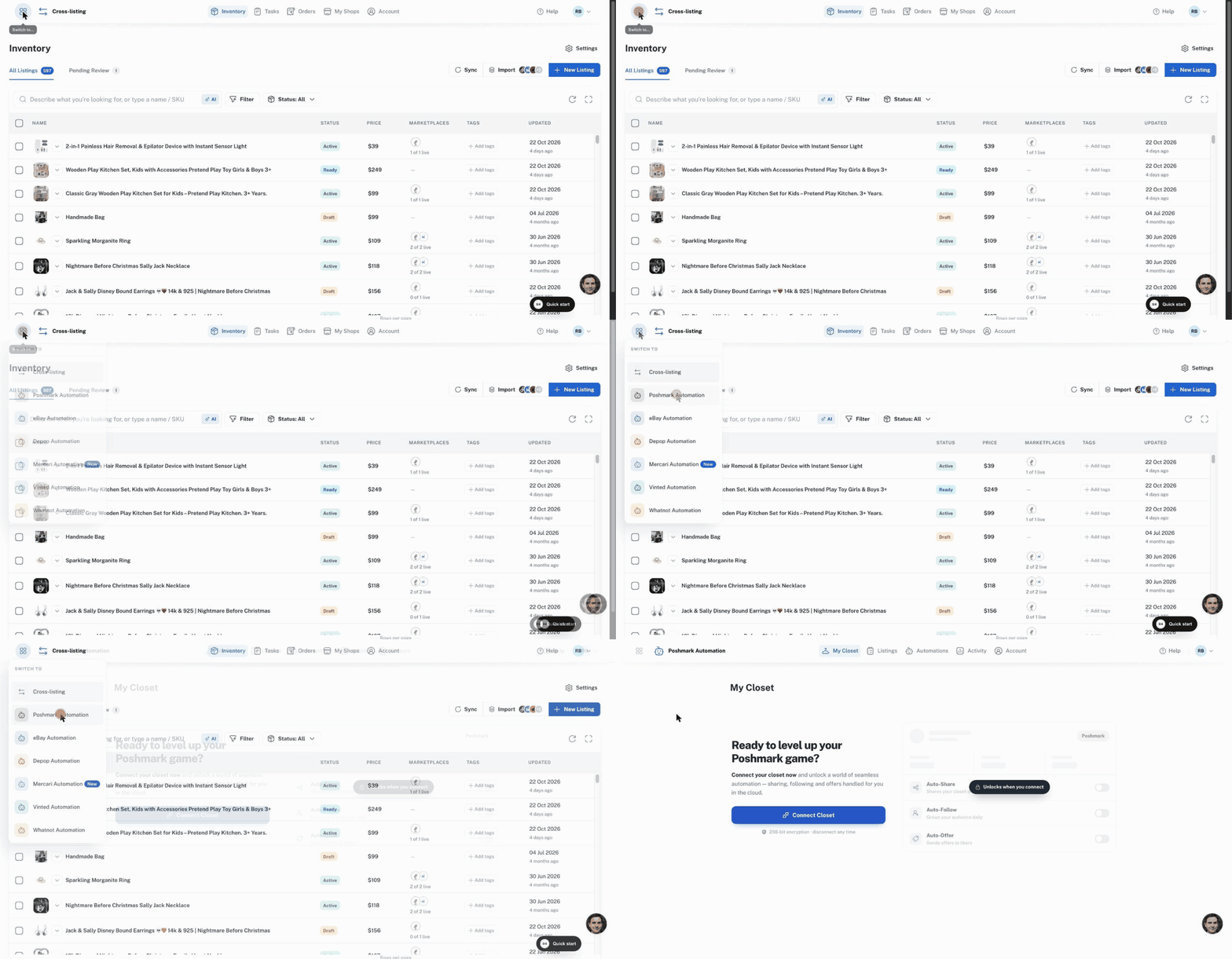
Each product has its own pages in the PrimeLister app. The name next to the 4-square icon at the top left shows which product you are in, for example **Cross-listing** (Crosslister Tool) or **Poshmark Automation**.
{% stepper %}
{% step %}
### Click the 4-square icon
It sits at the top left of the [**PrimeLister app**](https://app.primelister.com). Hover it to see "Switch to...". Click it and the **SWITCH TO** menu opens.
{% endstep %}
{% step %}
### Pick a product
Click the product you want, for example **Poshmark Automation**, **eBay Automation**, **Depop Automation**, **Mercari Automation** or **Cross-listing**.
{% endstep %}
{% step %}
### Check the name at the top left
The product's own pages open and its name shows next to the 4-square icon. For example, **Poshmark Automation** opens **My Closet**.
{% endstep %}
{% endstepper %}
Switching from Cross-listing to Poshmark Automation
{% hint style="warning" %}
**Seeing "paused due to your expired subscription"?** The banner is about the product you are looking at, not your whole account. For example, "Cross-listing Tool paused due to your expired subscription" shows on Cross-listing when your Crosslister Tool subscription has expired, even if your Poshmark Automation plan is active. Switch to the product you pay for, or check **Account > Plans & Billing** to see all your plans.
{% endhint %}
## Find your plans and invoices
Go to **Account > Plans & Billing**. Under **Your Subscriptions**, each product has its own card. Each card shows **Status**, **Quota Status**, **Created on** and, on a trial, **Expires**. **Invoice History** is on the right.
Each product has its own card on Plans & Billing
## Manage your plan
* **Start a subscription or change my plan**: see [Subscribe and change your plan](https://docs.primelister.com/subscriptions/change-your-plan.md).
* **Switch between monthly and yearly**: click **Update Plan** on the product's card. Unused time is added to your account as **balance** for future payments.
* **Cancel**: see [Cancel your subscription](https://docs.primelister.com/subscriptions/cancel-your-subscription.md).
* **Add or change my card**: use **Payment Method** on **Plans & Billing**.
* **Download an invoice**: scroll to **Invoice History**.
* **Prices**: see [Choosing a plan](https://docs.primelister.com/subscriptions/choosing-a-plan.md).
## Payment methods
* **Accepted cards**: Visa, Visa Debit, Mastercard, Discover, JCB and American Express.
* **Secure payments**: payments are handled by Stripe. PrimeLister never stores your card details.
* **International transaction fee**: if you see one on your statement, it comes from your bank, not PrimeLister.
## My card payment failed
Most failed payments are blocked by the bank. Find your case below.
### Card blocked for online or international payments
**Fix:** Turn on online and international payments with your bank.
### Bank flagged the payment as fraud
**Fix:** Call your bank, approve the PrimeLister charge, then try again.
### Not enough limit (common with virtual cards)
**Fix:** Set the card limit above the payment amount.
### 3D Secure check failed
**Fix:** Enter your card again while completing the payment. A card is only saved after a payment goes through.
If none of these fixes it, chat with our team and we look into it with you.
## Why was I charged again less than a month after my last payment?
A PrimeLister subscription keeps the same billing date, even when a payment is late. If a renewal payment fails and goes through later, that late payment pays for the period it was billed for. It does not start a new month from the day it went through. Your next renewal still comes on your usual billing date, so it can come less than a month after the late payment.
**Example:** your plan renews on the 11th of each month.
1. The September 11 renewal fails.
2. The payment goes through later, on September 26. It pays for September 11 to October 11.
3. The next renewal comes on October 11, your usual billing date.
You can see each payment in **Invoice History** on **Account > Plans & Billing**.
## FAQ
### My account says my subscription expired, but I am still being charged. Why?
You are most likely looking at a product you are not subscribed to. Each product has its own subscription and its own pages. Switch to the product you pay for with the 4-square icon at the top left (see [Switch between products](#switch-between-products)), or open **Account > Plans & Billing** to see every plan and its **Status**.
### I cancelled, but I was charged again. Why?
Each product is its own subscription, so a plan you did not cancel keeps renewing. Cancelling also does not refund a renewal that went through before you cancelled. See [Why was I charged after I cancelled?](https://docs.primelister.com/subscriptions/cancel-your-subscription.md#why-was-i-charged-after-i-cancelled)
### Does a late payment change my billing date?
No. A payment that goes through after a failed renewal pays for the period it was billed for, and your billing date stays the same. See [Why was I charged again less than a month after my last payment?](#why-was-i-charged-again-less-than-a-month-after-my-last-payment)
## Refunds
See our [Refund policy](https://docs.primelister.com/subscriptions/refund-policy.md).
**Need help?** [Chat with our team](https://docs.primelister.com/help-center/contact-support.md) in the [**PrimeLister app**](https://app.primelister.com).